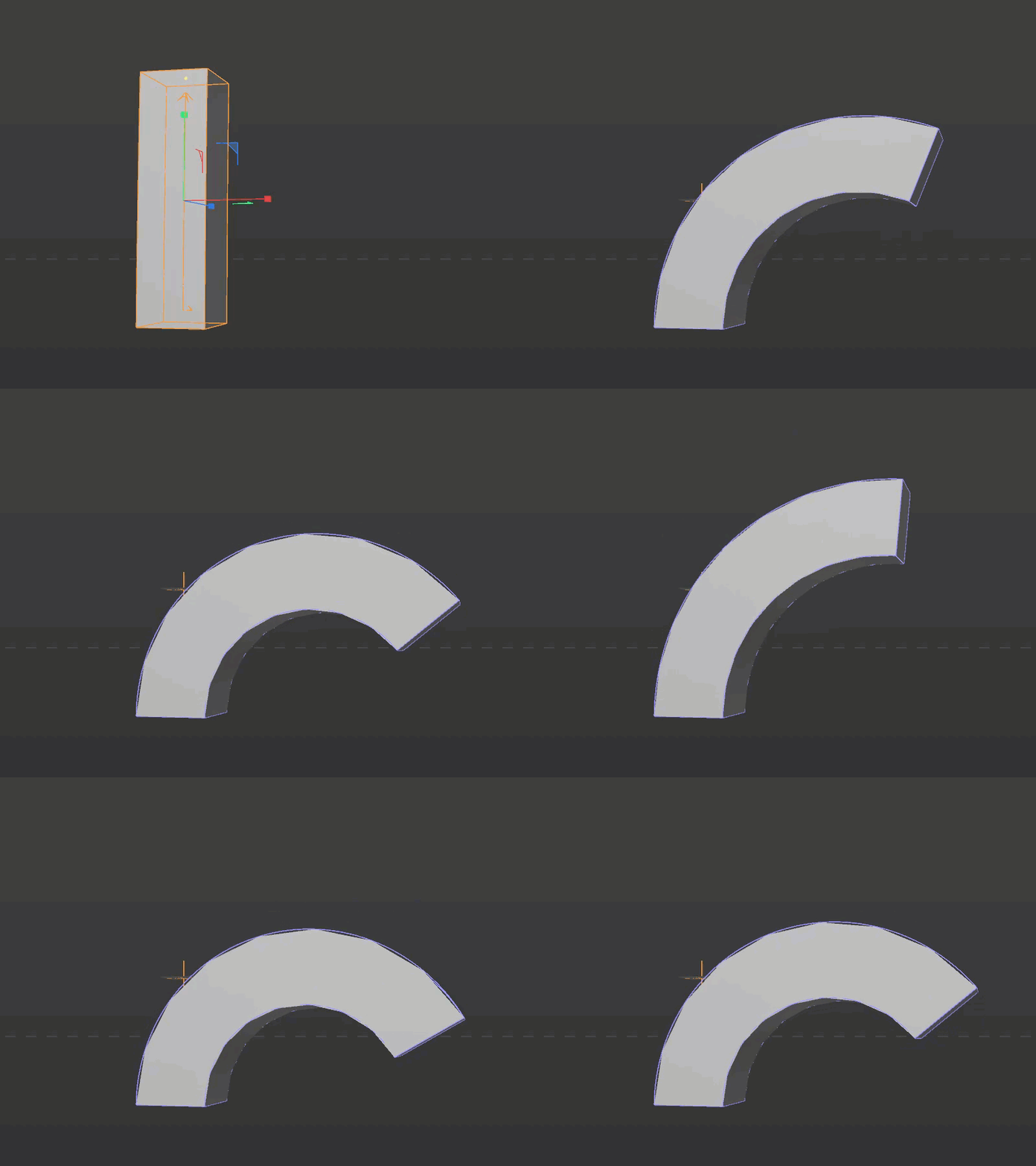
How to Apply a Spring Delay Effect to Any Parameter in Cinema 4D (Beyond PSR)
29 Apr 26 (6mo ago)
Normally, when you want to create a procedural delay or spring effect in Cinema 4D—that low-effort, high-impact animation trick—you reach for the MoGraph Delay Effector or the Track Modifier Tag (Spring).
They work great, but there is a major caveat: natively, the MoGraph Delay Effector only calculates Position, Scale, and Rotation (PSR) values. As you move into more complicated rigging and animation setups, basic PSR often doesn't cut it. You will most likely need to apply these effects to other keyable parameters, like Bend strength, light intensity, or custom User Data.
So, how do we fix this? The main idea is to trick the Delay Effector into treating standard parameter values as if they were PSR values. Below is the key setup to achieve exactly that.
The Xpresso Workaround for Non-PSR Parameters
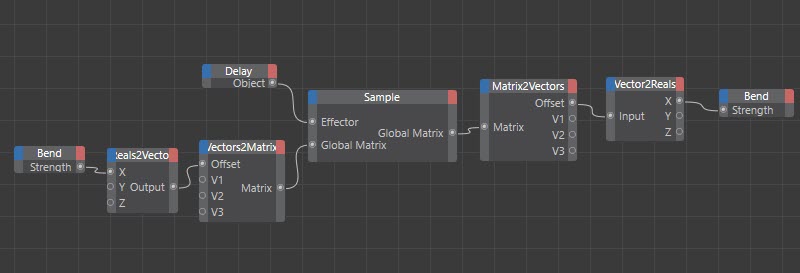
This setup is an Xpresso workaround to apply a MoGraph Delay Effector to an arbitrary parameter by disguising that parameter as spatial data. Because the MoGraph Delay natively only processes matrices (PSR), you have to package your data into a PSR format for it to be calculated, and then unpack it on the other side.
Step-by-Step Data Flow
Here is exactly how the Xpresso node network processes the data:
- Extract & Convert: The initial parameter value (e.g., Bend Strength, which is a single Real number) is fed into the
Xinput of a Reals2Vector node. - Disguise as PSR Data: That vector is then used as the Offset (Position) input of a Vectors2Matrix node. This effectively turns your single parameter value into spatial translation data.
- Apply the Delay: A Sample node takes this fabricated matrix and passes it through the MoGraph Delay Effector. The effector mathematically delays and smooths this matrix as if it were a standard object moving in 3D space.
- Unpack the Data: The delayed matrix output from the Sample node is broken back down using a Matrix2Vectors node to retrieve the newly modified Offset (Position).
- Write the Result: Finally, a Vector2Reals node isolates that delayed
Xvalue, which is then piped directly into your target parameter (in this case, the final Bend Strength).
Essentially, you are "smuggling" a standard parameter value through the Position channel of a matrix. This allows the Delay Effector to read it, smooth it out, and give you that beautiful procedural spring effect on absolutely any attribute.