Convert Silhouette Edges To Spline Houdini
27 May 26 (5mo ago)
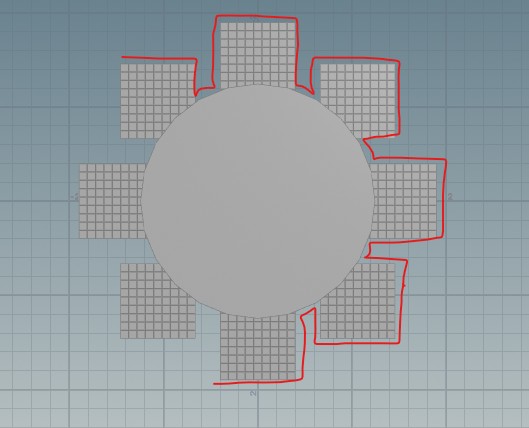
Usually for illustration, I just use dedicated 2D apps such as Affinity Designer to create my spline/paths. Unfortunately, even in 2026 and even for Adobe Illustration, 2D apps doesn't have any dedicaetd procedural functions.
So for complex 2D operations, I just use Houdini. Or I just want an excuse to use Houdini. 😈
So after creating your 2D mesh, just drop a boolean sop set to union.
You might need multiple boolean sop if you have multiple separate mesh.
Then add a divide sop but leave the second input free. Enable the Remove Shared Edges option.
This will delete all the inside edges and leave only the outer edges with one whole face
Then drop a convertline sop to actually convert to just spline/edges.
It looks okay but under the hood, the they are all separated. You can check on the number of primitives. Attach a polypath sop. Enable Connect End Points option. And you can check that the number primitives is more or less down to 1.
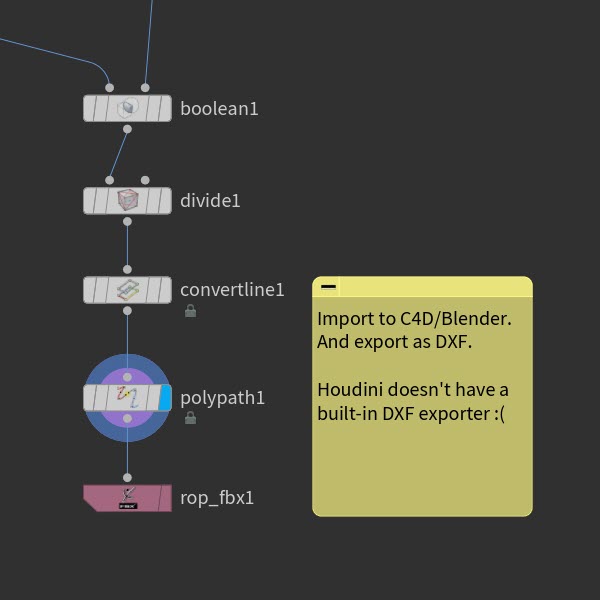
Unfortunately, as capable as Houdini, it doesn't have an inbuilt spline exporter.
So export it into FBX, import it to C4D/Blender, and from there export it into an DXF format.
This DXF format can be freely be imported to 2D Apps and even in cutting softwares for Silhouette or Cricut